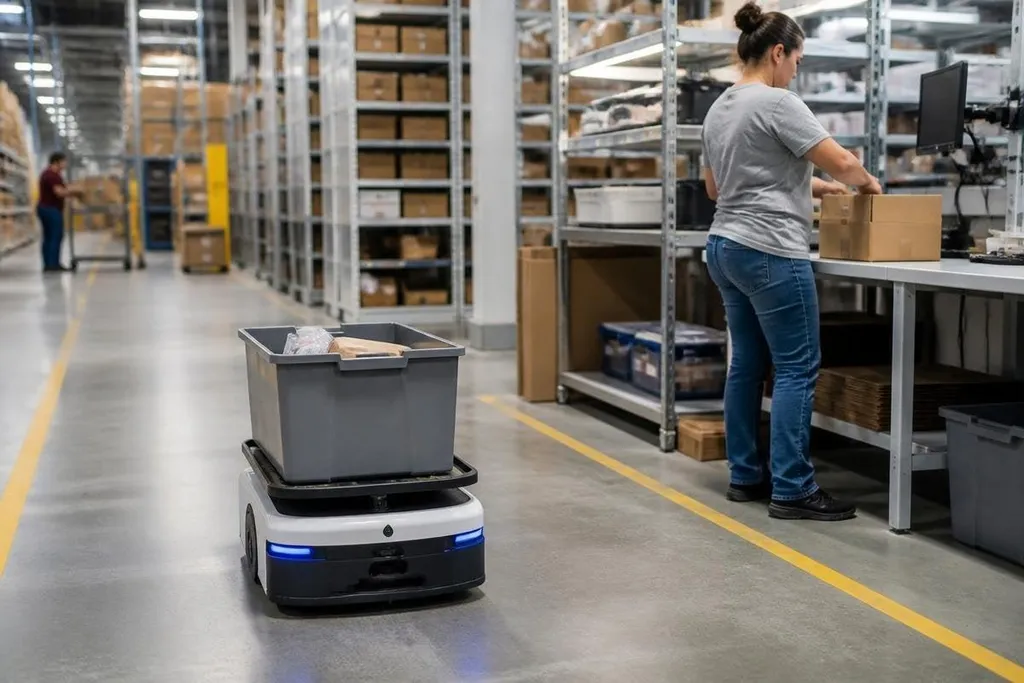
A warehouse robot can carry a tote across the building while a worker stays at a packing station. That can cut walking and lifting, but the same system brings safety, maintenance, and job-planning questions.
Quick read
- Mobile robots move shelves, bins, or parcels between work areas
- Robotic arms can sort, pick, pack, and scan repeatable items
- The main risks are downtime, poor handoffs, unsafe traffic, and unclear payback
Where robots help
The clearest gain comes from travel. A worker who walks to a shelf for each order spends time moving instead of picking. A mobile robot can bring the shelf or tote to a fixed station, where the worker scans the item and places it in the order.
That change also reduces repeated bending and carrying. It doesn't remove physical work from the process, since someone still handles products, deals with damaged packaging, and clears blocked paths. The work shifts toward checking, picking, and responding to exceptions.
Robotic arms fit tasks with stable shapes and known positions. They can pick items from set locations, place parcels into boxes, apply labels, or sort packages by destination. Their results depend on the gripper, camera view, lighting, and the range of products on the line.
Software connects these machines to the warehouse management system. An order enters the queue, the system selects a task, and the robot receives a route or motion plan.
A scan at the station can confirm that the item and order match before the parcel moves on.
The limits on a busy floor
Robots work best when the building, inventory, and task rules stay close to the conditions used during setup. A new shelf layout, a shiny package, a soft bag, or a blocked aisle can create work that needs a person.
That matters most during peak periods. More orders can mean more robots, but it can also mean more traffic at lifts, charging points, packing benches, and dispatch lanes. A small delay at one handoff can spread through the next steps.
Maintenance adds another cost. Motors, wheels, sensors, grippers, batteries, and conveyor parts all need inspection or replacement. A warehouse also needs people who can find the fault, restart the system safely, and finish orders when a robot is offline.
Repair costs are one part of the bill; the people working beside a robot face another question: what happens when it stops or changes course? Robot24 reports on the companies and warehouse systems behind these projects, so you can compare the robot’s stated task with the human work around it. That record leads into safety rules and changes to warehouse jobs.
Safety and work changes
A shared floor needs clear rules for people and machines. Mobile robots need controlled speed, obstacle detection, marked routes, and safe stopping points. Robotic arms need guarded work areas or sensors that stop motion when a person enters the operating space.
Training matters as much as the hardware. A worker should know how to report a blocked route, recover a failed scan, and use an emergency stop. The emergency stop also needs to be reachable from the place where a person may face a hazard.
Job design changes with the system. Some lifting and walking tasks may shrink, while work in monitoring, quality checks, maintenance, and exception handling grows. Managers need to explain those changes before the machines arrive, then check whether the new tasks fit the people doing them.
Data raises another concern. Robots and scanners can record item moves, worker actions, fault events, and system access. Access rules should limit who can change routes or view records, while backups should keep order processing going after a network or server fault.
What to check before buying
The price of a robot is only one part of the decision. You also need the station changes, software connection, safety work, spare parts, training, service contracts, and time spent testing the process.
I'd buy a robot only after a site test proves the full handoff, from order release to packed parcel.
Use this checklist before signing a contract:
- Map the task: Record walking distance, lifts, scans, waits, and manual touches during a normal shift.
- Test the hard items: Include soft bags, reflective packaging, small products, damaged boxes, and items that vary in shape.
- Measure the handoff: Check how a person receives, scans, picks, and passes each item to the next step.
- Plan failure work: Set a clear process for blocked routes, empty batteries, failed scans, network loss, and damaged goods.
- Price the whole system: Add installation, software, training, repairs, safety changes, and staff time to the robot price.
- Set a review date: Compare order speed, errors, injuries, downtime, and labor hours after the system runs in normal work.
The right fit is a repeatable task with clear inputs, stable traffic, and a safe manual backup. A robot that needs constant rescue may move work around without cutting the cost or risk. Before expansion, the warehouse should show that the robot keeps working through ordinary product changes and peak-order pressure.